M/PC – A Concatenative OS
摘要
M/PC 是一款为 Varvara 设计的拼接式操作系统,受 Openfirmware 启发,用于在无文件浏览器的情况下管理系统文件。它采用后缀表示法,即函数在其操作数后执行。文件可存储可重用的命令序列,tilde 前缀会包含文件内容。界面使用屏幕顶部单一提示符输入命令。控制方式包括:左右键导航栈、上下键滚动栈、A 键评估选中符号、B 键切换目录/返回。支持以 BIOS ROM 方式启动,使用 F4 让 Varvara 返回 BIOS 而非重启。开机时会尝试绘制名为 wallpaperWWxHH.icn 的 ICN 文件,其中 WW 为屏幕宽度除以 8 的十六进制值,HH 为高度。提供了所有原语的列表。源代码在仓库,最新支持清单、主题、snarf。
荐读理由
M/PC 用后缀表示法让文件存储可重用命令序列,通过tilde前缀包含文件内容,配合单prompt输入界面并支持键盘导航文件夹/启动ROM,实现无文件浏览器管理文件
原文
•/PC
M/PC is a concatenative operating system for Varvara, inspired by Openfirmware, designed to manage files on system without a file browser. It uses the postfix notation, meaning that the function success their operands:
( Get the number of bytes in folder/file_name )
folder/ file_name cat len dec
Files can store reusable sequences of commands, the tilde prefix includes the content of the file:
( Content of ./show-slide )
slide_ swp cat 3cx22.icn cat 1 icn
1 ~show-slide
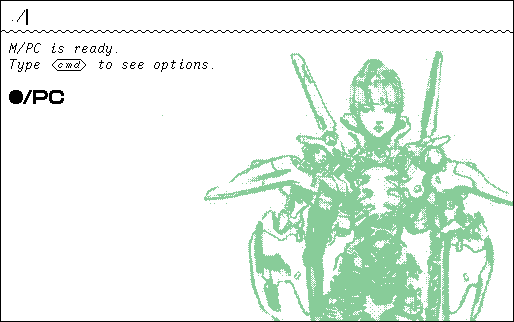
The interface uses a single prompt at the top of the screen to input commands:
Controls
The operating system can be used largely without a keyboard to navigate folders and launch roms:
left/right Navigate Stack
up/down Scroll Stack
A Evaluate Selected Symbol
B Directory/Back
Kiosk
To start M/PC as a BIOS rom so that when the user presses F4, Varvara returns to the BIOS instead of triggering a reboot, launch with arguments:
uxnemu m_pc.rom orca.rom run
Wallpaper
On boot, M/PC will try and draw an ICN file named wallpaperWWxHH.icn, where WW is the width of the screen divided by 8 in hexadecimal, and HH the height.
Reference
Here is the list of all primitives:
dir ( -- [f] )
	Put the file names in the current location on the stack.
mov ( path -- [f] )
	Move the current location to current/path, then do dir.

now ( -- date time )
	Puts the date Tue, 23 Jun 2026, and time 11:48:45 on the stack.

run ( f.rom -- ok )
	Run the rom file, return with F4.
icn ( f.icn blend -- ok )
	Draw an icn file with blend.
txt ( f.txt line -- ok )
	Read a text file starting at line.

len ( f -- hex )
	Put the length of a file in hexadecimal.
put ( body f -- ok )
	Create a file with the content of body.
get ( f -- body )
	Put the content of a file on the stack.
cpy ( fsrc fdst -- ok )
	Copy the content of fsrc into fdst.
era ( f -- ok )
	Erase file.
ren ( fsrc fdst -- ok )
	Rename file fsrc into fdst.

pop ( a -- )
	Pop symbol at the top of the stack.
dup ( a -- a a )
	Duplication symbol at the top of the stack.
ovr ( a b -- a b a )
	Copy second symbol to the top of the stack.
swp ( a b -- b a )
	Pull the second symbol to top.
rot ( a b c -- b c a )
	Pull the third symbol to top.

add ( a b -- a+b )
	Push the sum of two symbols.
sub ( a b -- a-b )
	Push the difference of two symbols.
dec ( hex -- dec )
	Convert hexadecimal number to decimal.
hex ( dec -- hex )
	Convert decimal number to hexadecimal.
cat ( a b -- ab )
	Concatenate two symbols.

cmp ( a b -- bool )
	Compare the names of two symbols.
and ( a b -- bool )
	Put true if both symbols are true.
ora ( a b -- bool )
	Put true if either symbol is true.

rsz ( width height -- )
	Resize the screen, puts true if resize is supported by Screen.
out ( a -- )
	Output symbol to Console/write.
bye ( -- )
	Quit.
Source, Latest
**incoming: **2026
这条对你有帮助吗?