Proof of care in the age of AI
摘要
作者手写文章后,用照片制作 SVG 文件叠加文字图层,通过 Barlow Condensed 字体匹配手写尺寸,插入空格字符与窄空格(将用 JavaScript 移除),并利用 Inkscape Anchor 功能制作超链接。SVG 导出后进行嵌入字体、替换 Six-per-em Space 字符、转换图片路径为完整 URL 等后期处理,最终插入 HTML 中的<svg>元素实现复制时文本可直接粘贴。
荐读理由
照他这套 SVG 叠手写手写稿 + 反向复制清除 + 嵌入样式 + 替换 Six-per-em Space 的组合,就能零代码实现 AI 生成文章的手写质感,完美匹配你独立开发者做工具的路径
原文
Click here to see the “how this was made” feature
I wrote this piece by hand and photographed the pages. After that, I wanted to make the text copy-pasteable. So I put the images into one SVG file with a text overlay:
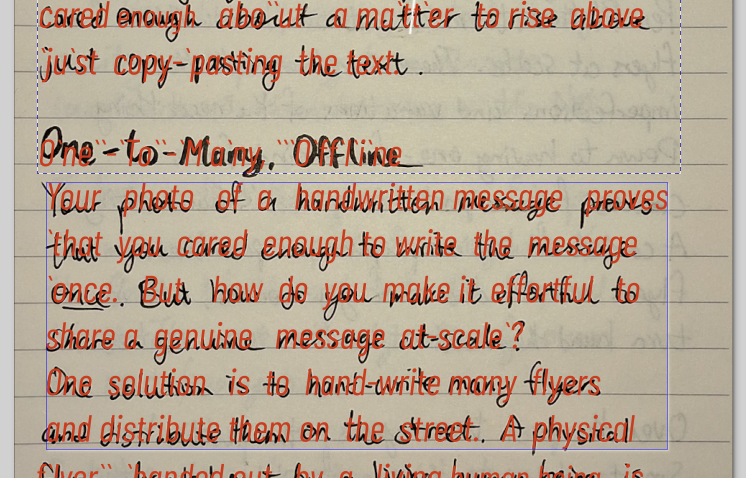
Pictured: overlaid + spaced out text. Notice the ` spacers and extra spaces.
The font (Barlow Condensed – Italic Condensed) and the line height roughly match my handwriting’s dimensions. For spacing, the idea was that I’d add spacing characters that’ll be removed in Javascript during the copy-paste event that fires on the webpage.
I used ` (backtick) characters for narrow spaces that’ll be fully removed, and multiple spaces between words where I planned to collapse them into just 1 space. The hyperlinks are made using Inkscape’s Create Anchor functionality.
After exporting the SVG file, it required some post-processing:
Embedding the font using
<style>Replacing the ` characters with Six-per-em Space characters so the backticks don’t show up when selected
Replacing the linked local image filepaths with full URLs
Finally, the SVG is fully added as an <svg> element into the HTML file. I couldn’t trigger on-copy Javascript events if I embedded it as an <object>.
这条对你有帮助吗?