Os8088: A powerful Mac-like OS for the IBM XT, 286, 386
摘要
os8088 是一个为 Intel 8086/8088(IBM PC/XT 级别硬件)编写的图形操作系统,用 NASM 实模式汇编写成,共 112,792 行,由 AI 辅助生成。它从软盘引导,无 DOS 底层,提供仿 1984 年 Macintosh System 1 的桌面:重叠窗口、下拉菜单、串口鼠标、可加载程序,并实现了真正的抢占式多任务(12 个任务槽,18.2Hz 定时器切换),这是当年 Mac 和 GEM 都没有的。内核 78,950 字节,整个系统在 256K 内存下运行,支持 VGA(16 色)、Hercules 和 CGA 显示。文章详述了其技术实现:窗口拖动用 XOR 轮廓、程序从软盘加载到独立段、系统监视器、最小化任务仍运行、文件图标从磁盘文件头读取等。还包含大量截图说明,展示记事本、时钟、弹球、控制面板、任务管理器、文件管理器、扫雷、Markdown 编辑器、MOD 播放器、位图编辑器、Mandelbrot 浏览器、钢琴、录音机、纸牌等程序同时运行。文章也介绍了它在真实硬件(1981 IBM 5150、Toshiba T1100 Plus、286)上的运行情况,并讨论了它与 1985 年 Digital Research GEM 的历史关联。最后明确它不是 DOS、无内存保护、无文件句柄、无网络,是一个完成度足够使用的业余项目,提供浏览器演示和软盘镜像下载。
荐读理由
os8088 用 AI 写汇编、在 8086 上实现抢占式多任务和可加载程序包,这套在极简硬件上做图形系统的思路可直接迁移到你的嵌入式或复古项目
原文
os8088 1.0
This operating system was written using AI. Yes, AI. Not by Hand.
The graphical operating system that could have been for the IBM XT
A Macintosh System 1-style desktop for the Intel 8086, written entirely in real-mode assembly and booted from a floppy. Overlapping windows, pull-down menus, a serial mouse, loadable programs -- and pre-emptive multitasking, which the real 1984 Macintosh never had.
in VGA, 16 colors
in Hercules, mono
in CGA, mono
of RAM
256K
byte kernel
78,950
pre-emption, 12 tasks
18.2Hz
Boot it in your browser Download the floppies Screenshots
os8088****
****``
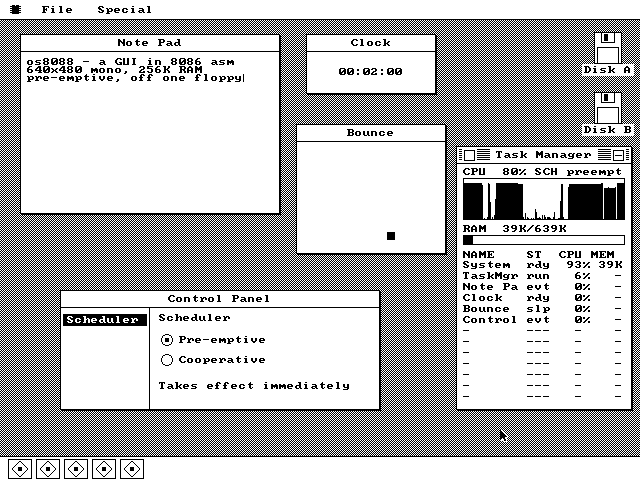
Five programs at once, on a CPU from 1978. A Note Pad loaded off the software floppy, a ticking Clock, a bouncing ball, the Control Panel and the Task Manager, each a separate instance with its own dock tile. The Task Manager reports the machine at 70% busy and 147K of RAM in use. Nothing is running here. The whole system at rest, a few seconds after the 512-byte boot sector loaded the kernel and jumped to it. There is a floppy icon for each drive the machine actually reports through the BIOS, and the dock is empty because os8088 launches nothing at startup. A menu lives only while the button is down. Press in the menu bar, drag through the items, release on the one you want. There is no spare copy of the screen to restore from, so the pixels behind the pull-down are copied into a block claimed off the heap for exactly as long as the menu is up. The window has not moved. A title-bar drag caught halfway through: a hollow one-pixel outline is tracking the pointer in XOR mode, so erasing it is the identical operation to drawing it -- you can watch it invert the Disk window's own title text where it crosses. Every app can run several times over. A Disk window, two Clocks and two Bounces, each a separate record in the instance table, each cascaded sixteen pixels down and right from the previous copy of its kind. Every instance gets a dock tile, and the tile's position is its table slot. Keystrokes reach the front window only. Two lines typed on the emulated keyboard, wrapped in the window's 258-pixel content area, with the caret after the last character. Each Note Pad instance gets its own 512-character buffer, and as many can be open at once as the heap has room for. The third line is not a string constant. The word pre-emptive is rendered from the kernel's live scheduler byte every time the box paints, so the About box, the Control Panel and the Task Manager structurally cannot disagree about which scheduler is running. A system monitor, with its graph filled. One sample every nine ticks into a 160-column ring, so a full sweep across the window is about eighty seconds of history. Apps with no task of their own get their window callbacks timed at the dispatch site and billed to them, so the rows still add up to one total. One byte of state, three windows agreeing. The settings pane keeps no copy of the scheduler mode: it reads the kernel's mode byte every time it draws. Click Cooperative and the very next timer tick declines to switch tasks, with no restart and no handshake. Two of these five are not on screen. Clock and Bounce were sent to the dock with the minimize box in their title bars, and their tiles draw inverted so you can see at a glance what is hidden. Minimized is not stopped -- the Clock is still counting, it only skips drawing. A file manager reading a floppy, on an 8086. The software disk mounted on drive B:, with each file's name, size and its own icon. The icons come off the disk itself -- the browser peeks each file's first sector, where a package carries its own 16x16 bitmap -- so the list shows a real icon without loading it. Two programs in two segments, side by side. MINES and HELLO came off the same floppy into separate regions claimed off the heap -- 2,048 bytes and 512 -- and each runs at offset zero inside its own, which is why nothing had to be patched on the way in. 1,510 bytes off a floppy, like a built-in. Double-clicking the MINES row read it into a segment of its own and opened its window; from then on its paint, key and click procs are plain near offsets the kernel calls exactly like a built-in's. This board is the only place in the system that uses more than two colors. A Markdown writer, ported from the Mac. ActionRetro's writing app for classic 68k Macintoshes, rebuilt for the 8086. That black bar across the top is not the system's menu bar -- it is the program's own pixels, drawn and tracked by the program, down to the triple flash when you pick an item. A four-channel Amiga MOD player, playing. Notes scrolling under a highlighted playing row, four channel meters moving, the sample list down the side. A background task keeps the sound card's ring of buffers fed while the foreground redraws a screen's worth of pattern text, and neither waits for the other. A bitmap editor that sizes itself to fit. Paint asks the kernel how much memory is actually free and then decides what it is allowed to be, giving up features one tier at a time on a smaller machine. The swatch row is the one place the interface is in color on purpose. What background tasks were built for. A Mandelbrot explorer that renders in three progressive passes on a task of its own, so the rest of the desktop keeps running while it iterates. It caches the first pass alone -- one word per run of identical color, 4,000 bytes -- and replays that when the window is uncovered. Two octaves, mouse or keyboard. Every note the Piano plays is also written onto the staff above the keys, and the staff replays. On a machine with a sound card the loadable driver moves the tone off the PC speaker and onto the card's FM chip without the Piano knowing anything has changed. Sampled sound in and out. The Recorder captures and replays digitized audio over the same ring of buffers the MOD player uses, and does not care which device is on the other end: a Sound Blaster's DMA channel where there is one, the PC speaker where there is not. The status line names it. Klondike, dragged the way windows are. Picking up a card does not redraw anything: it draws a one-pixel inverted outline that erases itself before the drawing lock is released, so the table underneath is not touched until you let go -- exactly how the system drags its own windows. A game loop that is a task. A ball has to keep moving between keystrokes, so the game loop is the program's background task -- one frame per timer tick -- and everything the foreground does is set a word the loop reads. A held arrow key is inferred from the keyboard's own auto-repeat. The first program the loader ever ran. A 9x9 board of 16-pixel cells, an icon embedded in its own header, and paint, key and click procedures the kernel calls exactly as it calls the system's own. The first click is always safe -- the mines are laid after you have chosen where to start. Note Pad left the kernel for the floppy. Moving it out reclaimed about 1.4KB of the kernel's segment, and it removed a limit rather than adding one: as a built-in it had a fixed pool for exactly two instances, and as a package it has no cap at all. The whole interface, in 322 bytes. A header, a window template, a paint procedure, and nothing else -- the smallest program the system can load. It is also the only one that deliberately ships without an icon, so that the generic application icon in the Disk window has something to prove itself on.
What it is
os8088 boots from the first sector of a floppy into a graphical desktop. There is no DOS underneath it and no command line anywhere in it -- the 512-byte boot sector loads a 40KB kernel, the kernel works out which display adapter the machine has and switches it into graphics, borrows the video card's own 8x8 character set, and puts up a menu bar.
Everything after that is the interface you remember from a 1984 Macintosh: windows you drag by the title bar with a rubber-band outline, menus you pull down and drag through, a close box and a minimize box, icons for each floppy drive, and a dock along the bottom with one tile per running program. Programs load from a second floppy and run as first-class applications, several at a time.
The whole thing fits in 256K of RAM on an Intel 8086 or 8088 -- the processor in the original IBM PC and PC/XT. It is a hobby project, it is finished enough to use, and the source is 112,792 lines of NASM you can read in an afternoon.
Video log****
Video log
os8088 gets recorded as it is built -- one video per step, from the first boot into a desktop to loadable packages. They are all on the video log.
By the numbers
Every figure below comes from the build, not from memory.
| Kernel size | 78,950 bytes | The scheduler, window manager, VGA driver, mouse driver, sound layer, file manager, loader, Task Manager and Control Panel, all of it. |
|---|---|---|
| Boot sector | 512 bytes | LBA-to-CHS translation and retrying BIOS floppy reads. The build fails if it assembles to anything else. |
| Segment footprint | 53,842 bytes | Code plus every buffer the kernel reaches through DS. It must fit the 64K segment -- currently 11,694 bytes of headroom. The task stacks, the disk buffers and every loaded program live outside the segment and are not counted here. |
| Lines of assembly | 112,792 | Real-mode 8086, written with AI. No C, no linker, no runtime library. |
| Display | VGA, Hercules or CGA | Probed at boot. VGA mode 12h is 640x480 in 16 colors -- four 1-bit planes, 80 bytes per scanline; Hercules is 720x348 and CGA 640x200, both monochrome and banked. Drawn straight to the framebuffer on all three. |
| Back buffer | optional, off by default | An off-screen copy of the screen is 153,600 bytes, more than half the machine's memory, so a 256K machine always draws straight to the display, as the 1984 Macintosh did. At 500K or more the Control Panel can switch one on. |
| Tasks | 12 slots, 1,536-byte stacks | Each Clock and each Bounce window is its own pre-empted task. |
| Context switch rate | 18.2065 Hz | The PC's stock timer rate. Every tick the handler saves nine registers, swaps the stack pointer and returns into a different program. |
| Loadable programs | a segment each | Packages loaded from a second floppy into their own regions of conventional memory -- about 107K of arena on a 512K machine, 233K at 640K -- several resident at once, each freeing its memory when closed. |
| Mouse | 1200 baud, 7N1 | A Microsoft serial mouse on COM1, three bytes per report, decoded in an interrupt handler that also draws the cursor. |
| Target hardware | IBM PC/XT, 8088 at 4.77MHz | 256K of RAM, a serial mouse, and any of a VGA, Hercules or CGA card. Repaints are slow enough to watch happen. |
| Instruction set | 8086 only, enforced | cpu 8086 plus -w+error, so anything newer is a build failure. A 1978 instruction set, mechanically guaranteed. |
What it does
Four of the things it is actually good at. There are more on the screenshots page.
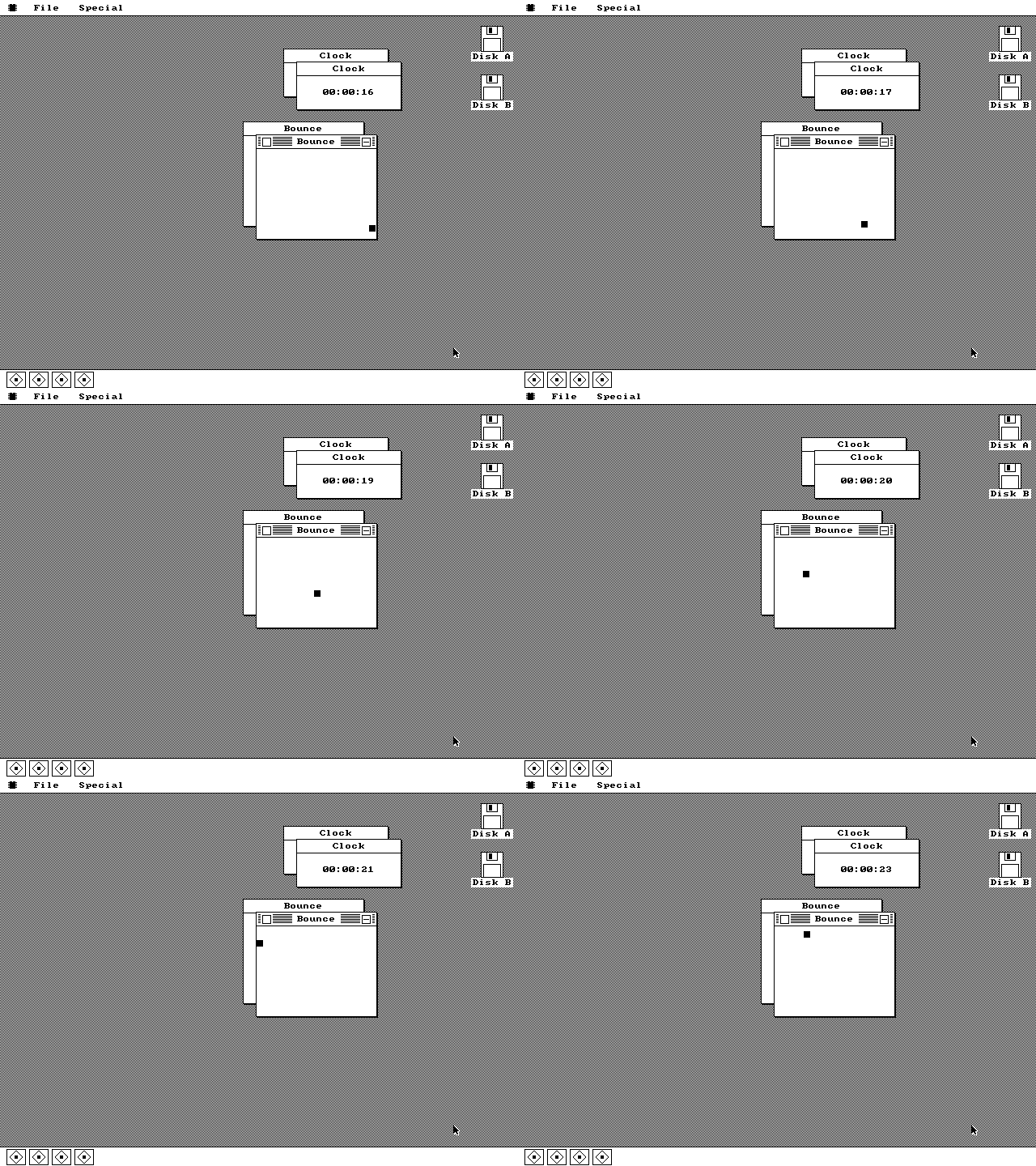
Nothing has to cooperate. Two clocks keep time and two balls keep moving while you type into something else. The timer interrupt fires 18.2 times a second, saves whichever task was running, swaps the stack pointer and returns into the next one -- about thirty instructions. The Macintosh of the period could not do this at all: System 1 ran one application at a time, and when MultiFinder arrived in 1987 it was cooperative.
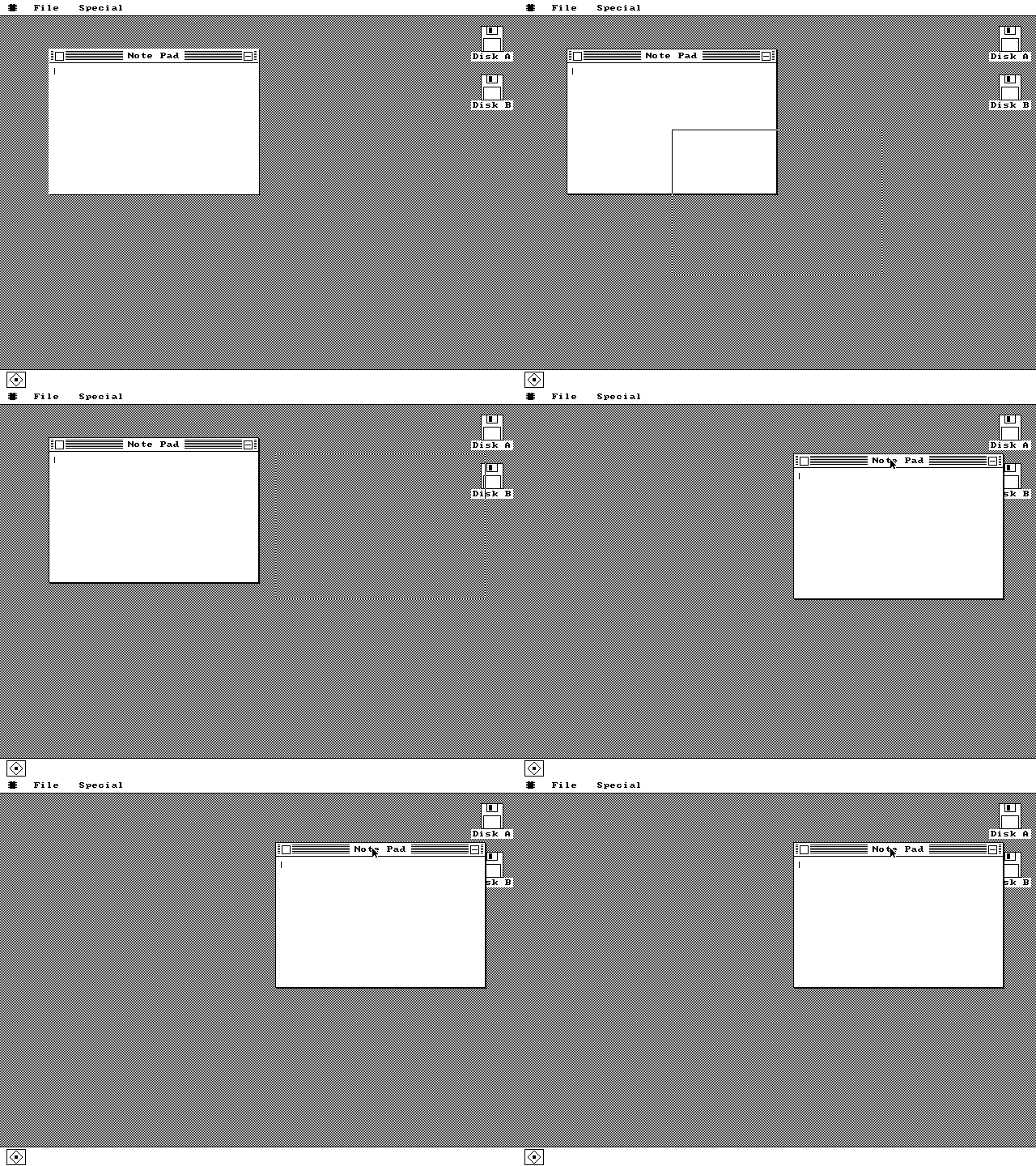
The window does not move until you let go. A one-pixel XOR outline follows the pointer and the window snaps to it on release -- because redrawing a whole window on every mouse report was out of the question at 4.77MHz, exactly as it was in 1984.
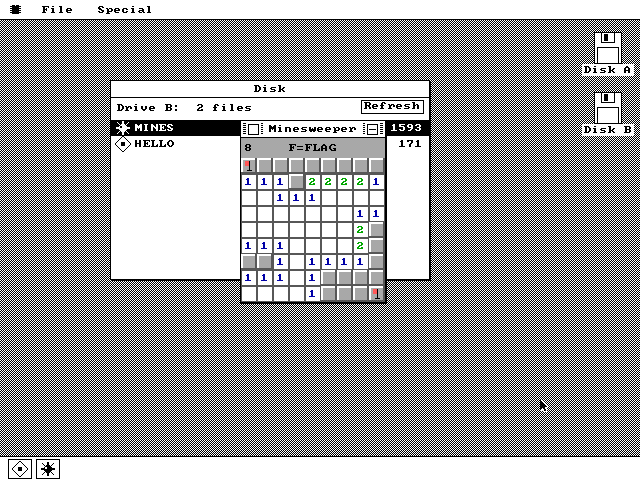
Programs come off a second floppy. Double-click a file in the Disk window and it loads into a segment of its own and runs as a real application. Minesweeper is 1,510 bytes including its icon. Several packages -- or several copies of one -- can be resident at the same time.
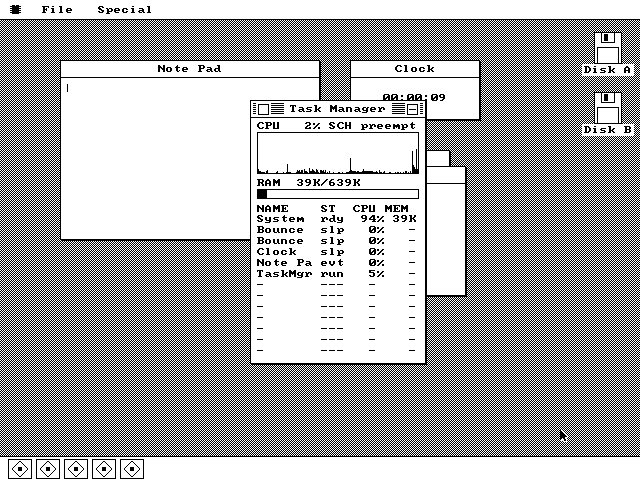
It watches itself. A live CPU meter with a scrolling history graph, a RAM readout, and one row per running program. Apps without their own task get their window callbacks timed at the dispatch site and billed to them, so the rows still add up to one total.
It runs on the real thing
Everything above was captured in an emulator. In August 2026 someone wrote the disk images onto actual floppies and booted them on three period machines -- a 1981 IBM 5150, a Toshiba T1100 Plus and a 286 -- and photographed the results.
IBM 5150, 8088 at 4.77MHz
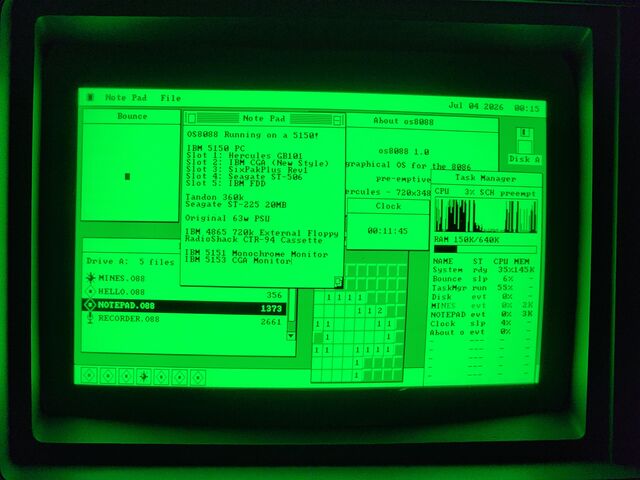
Six programs at once on a 1981 IBM PC. A real 5150 driving a Hercules card at 720x348, booted off a 360K floppy, with the machine's own card list typed into a Note Pad that was loaded from that same disk. Photographed by Elendilon, who also reported that it is no slower here than it is under emulation.
The history it is arguing with
In February 1985 Digital Research shipped GEM 1.0 for the IBM PC: a Macintosh-style desktop with overlapping windows and icons, running on stock XT hardware. Apple sued. The settlement led to GEM Desktop 2.0 in 1986, which removed overlapping windows and desktop icons on the PC -- while the Atari ST version, not covered by the agreement, kept them.
So the PC did briefly have this, and then it did not. os8088 is a rebuild of roughly that idea, from scratch, forty years later, on the same class of machine -- plus the pre-emptive multitasking that neither GEM nor the Macintosh of the period offered.
What it is not
It is not DOS and it does not run DOS programs. There is no DOS underneath it; it owns the machine from the boot sector up.
It has no memory protection. The 8086 has none to offer -- every program shares one 64K segment with the kernel, which is precisely what makes a context switch cheap enough to be worth doing.
There are no file handles and no seeking. The disk API moves whole files at a time -- write, read, delete, rename -- which is the largest subset that stays honest with no disk cache and twelve pre-empted tasks.
There is no networking.
It is a hobby project, not a product. It is also complete enough that you can sit down and use it, which is the whole point.
Try it
The browser demo boots the real floppy image in an emulated PC -- same bytes you would write to a disk. If you would rather run it yourself, the download page has 360K images for period hardware and 86Box, and 1.44MB images for QEMU.
这条对你有帮助吗?