The Tao of Datastar
摘要
Datastar 是一款工具,其核心哲学(The Tao of Datastar)是团队对如何使用 Datastar 构建可维护、可扩展、高性能 Web 应用的建议。内容包括:状态应放在后端(后端为真值来源);默认配置推荐优先使用;用 patch 元素和 signals 更新前端;谨慎使用 signals(仅限用户交互或发送新状态);信任 morph(仅更新修改部分 DOM,可发送 “fat morph” 整棵 DOM 树);SSE 响应支持事件流,无需特殊 content-type;压缩响应用 Brotli 可达 200:1;后端用模板语言保持 DRY;页面导航用<a>标签或后端重定向,结合 View Transition API;浏览器历史由浏览器自动管理;采用 CQRS 模式(写操作和读操作分离),使实时协作简易;加载指示器用 data-indicator 属性;CQRS 场景下手动控制加载指示器;乐观更新可能欺骗用户,建议用加载指示器而非乐观更新;无障碍设计 Datastar 不介入,需自行用语义 HTML、ARIA、键盘和屏幕阅读器支持(附 data-attr 示例)。
荐读理由
根据Datastar官方核心团队意见,多数应用状态应置于后端(backend as source of truth),前端只通过patch HTML元素和signals接收;信号仅用于用户交互和表单绑定,避免前端状态管理;使用CQRS实现实时协作、morphing支持fat morph提升性能、优化加载指示和悲观更新;这些能直接迁移到你的AI工程项目,用于构建可维护可扩展的高性能前端
原文
The Tao of Datastar
Datastar is just a tool. The Tao of Datastar, or “the Datastar way” as it is often referred to, is a set of opinions from the core team on how to best use Datastar to build maintainable, scalable, high-performance web apps.
Ignore them at your own peril!
State in the Right Place
Most state should live in the backend. Since the frontend is exposed to the user, the backend should be the source of truth for your application state.
Start with the Defaults
The default configuration options are the recommended settings for the majority of applications. Start with the defaults, and before you ever get tempted to change them, stop and ask yourself, well... how did I get here?
Patch Elements & Signals
Since the backend is the source of truth, it should drive the frontend by patching (adding, updating and removing) HTML elements and signals.
Use Signals Sparingly
Overusing signals typically indicates trying to manage state on the frontend. Favor fetching current state from the backend rather than pre-loading and assuming frontend state is current. A good rule of thumb is to only use signals for user interactions (e.g. toggling element visibility) and for sending new state to the backend (e.g. by binding signals to form input elements).
In Morph We Trust
Morphing ensures that only modified parts of the DOM are updated, preserving state and improving performance. This allows you to send down large chunks of the DOM tree (all the way up to the html tag), sometimes known as “fat morph”, rather than trying to manage fine-grained updates yourself. If you want to explicitly ignore morphing an element, place the data-ignore-morph attribute on it.
SSE Responses
SSE responses allow you to send 0 to n events, in which you can patch elements, patch signals, and execute scripts. Since event streams are just HTTP responses with some special formatting that SDKs can handle for you, there’s no real benefit to using a content type other than text/event-stream.
Compression
Since SSE responses stream events from the backend and morphing allows sending large chunks of DOM, compressing the response is a natural choice. Compression ratios of 200:1 are not uncommon when compressing streams using Brotli. Read more about compressing streams in this article.
Backend Templating
Since your backend generates your HTML, you can and should use your templating language to keep things DRY (Don’t Repeat Yourself).
Page navigation hasn't changed in 30 years. Use the anchor element (<a>) to navigate to a new page, or a redirect if redirecting from the backend. For smooth page transitions, use the View Transition API.
Browser History
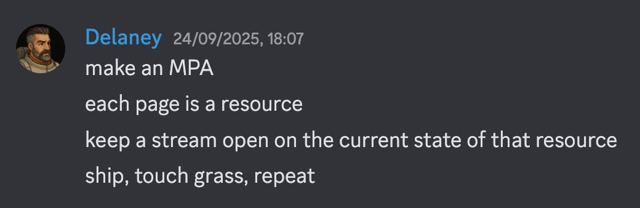
Browsers automatically keep a history of pages visited. As soon as you start trying to manage browser history yourself, you are adding complexity. Each page is a resource. Use anchor tags and let the browser do what it is good at.
CQRS
CQRS, in which commands (writes) and requests (reads) are segregated, makes it possible to have a single long-lived request to receive updates from the backend (reads), while making multiple short-lived requests to the backend (writes). It is a powerful pattern that makes real-time collaboration simple using Datastar. Here’s a basic example.
1<div id="main" data-init="@get('/cqrs_endpoint')">
2    <button data-on:click="@post('/do_something')">
3        Do something
4    </button>
5</div>
Loading Indicators
Loading indicators inform the user that an action is in progress. Use the data-indicator attribute to show loading indicators on elements that trigger backend requests. Here’s an example of a button that shows a loading element while waiting for a response from the backend.
1<div>
2    <button data-indicator:_loading
3            data-on:click="@post('/do_something')"
4    >
5        Do something
6        <span data-show="$_loading">Loading...</span>
7    </button>
8</div>
When using CQRS, it is generally better to manually show a loading indicator when backend requests are made, and allow it to be hidden when the DOM is updated from the backend. Here’s an example.
1<div>
2    <button data-on:click="el.classList.add('loading'); @post('/do_something')">
3        Do something
4        <span>Loading...</span>
5    </button>
6</div>
Optimistic Updates
Optimistic updates (also known as optimistic UI) are when the UI updates immediately as if an operation succeeded, before the backend actually confirms it. It is a strategy used to makes web apps feel snappier, when it in fact deceives the user. Imagine seeing a confirmation message that an action succeeded, only to be shown a second later that it actually failed. Rather than deceive the user, use loading indicators to show the user that the action is in progress, and only confirm success from the backend (see this example).
Accessibility
The web should be accessible to everyone. Datastar stays out of your way and leaves accessibility to you. Use semantic HTML, apply ARIA where it makes sense, and ensure your app works well with keyboards and screen readers. Here’s an example of using data-attr to apply ARIA attributes to a button that toggles the visibility of a menu.
1<button data-on:click="$_menuOpen = !$_menuOpen"
2        data-attr:aria-expanded="$_menuOpen ? 'true' : 'false'"
3>
4    Open/Close Menu
5</button>
6<div data-attr:aria-hidden="$_menuOpen ? 'false' : 'true'"></div>
这条对你有帮助吗?