Using ThinkPad T480 as a mobile phone
摘要
作者介绍如何将 ThinkPad T480 改装成功能完整的手机,支持通话、短信和移动数据。他利用 Intel ME 的漏洞刷入 Libreboot 解除无线网卡白名单,选用 Quectel EG25-G 调制解调器,并为其刷入自定义固件,使调制解调器注册为 USB 音频接口以处理通话音频。文中提到 M.2 版本调制解调器罕见且天线接口不兼容,需要转换线,但可以完成。作者还提到可用 Waydroid 原生运行 Android 应用。
荐读理由
照文中的完整步骤——刷 Libreboot 去掉无线网卡白名单、选 Quectel EG25-G 并刷自定义固件注册成 USB 音频接口——就能把 T480 变成能通话、收发短信的移动电话,天线转接是唯一硬坑,可直接复用到你手上的硬件折腾项目
原文
Using ThinkPad T480 as a mobile phone
26/07/2026
ThinkPad T480 can be used as a fully featured mobile phone, supporting calls, SMS and mobile data. Here is a video of me receiving a phone call on mine (with the 25 year edition keyboard):
This laptop already has a SIM card slot for LTE modems. However, the PCM pins for audio transmission are not connected.
Luckily, thanks to an bug in Intel Management Engine, we can flash Libreboot instead of the stock firmware. This removes the whitelist for wireless cards and lets us choose our own modem. A good choice is Quectel EG25-G, since it was used in PinePhone and received some scrutiny. In particular, inside is an ARM core running Android (most Android phones1 standalone modems have an Android system running in the modem). There is a custom firmware available with free software userspace. You set this firmware to register the modem as a USB audio interface and get the audio for phone calls. SMS and mobile data work out of the box.
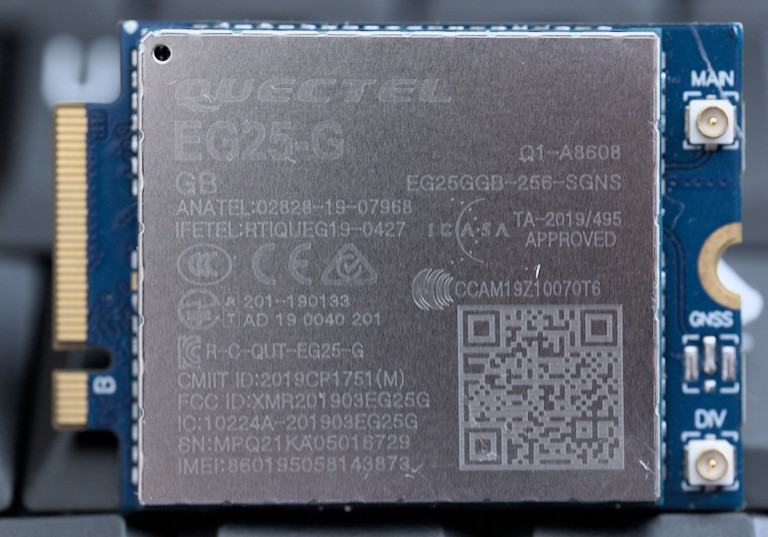
M.2 versions of Quectel EG25-G (suitable for the T480) are quite rare and don’t have compatible antenna connectors. I needed conversion cables for the antennas, which were really finicky. But it can be done.
Therefore, you can now throw away your mobile phone and use a laptop only! You can even use Android apps natively with Waydroid.
这条对你有帮助吗?