A tale of two path separators (2021)
摘要
文章从 Finder 中可创建带 “斜杠” 名称的文件/文件夹现象切入,说明 macOS 实际同时保留了两套路径分隔符:经典 Mac OS(HFS+)使用冒号(:),Unix/NeXTSTEP(UFS)使用斜杠(/)。系统会在不同 API 和上下文之间自动转换,因此同一个文件名在 Finder、ls、AppleScript 等环境中可能显示为不同字符。作者引用 Apple 工程师论文说明这种兼容层设计,并指出即使底层文件系统已从 HFS+ 迁移到 APFS,这种双分隔符行为仍被保留,推测是为了向后兼容大量旧软件。文章同时借此回顾不同操作系统历史上的路径表示方式,说明 “斜杠一定是目录分隔符” 其实更多是 Unix 体系占主导后的习惯认知。
荐读理由
macOS 保留了 HFS+ 的冒号分隔符(兼容老 AppleScript 系统 7)和 Unix 的斜杠分隔符(兼容 POSIX),系统在 Finder 和 ls 间自动翻译,避免 APFS 取代 HFS+ 后大量软件崩溃
原文
A tale of two path separators
- Posted 1 December 2021
I was reminded yesterday that macOS will happily let you create files that appear to have slashes in their name, as shown here by the Finder:
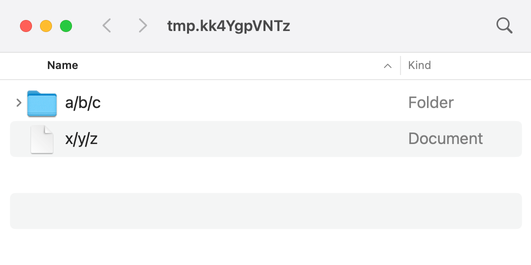
I made the folder with the “New Folder” button in Finder, and the text file by saving it in TextEdit. Even though I understand how this works, it breaks my brain a bit every time.
If you didn’t know how this works, you could get a clue by running ls:
$ ls
a:b:c/     x:y:z.txt
The files have either colons or slashes in their name, depending on how you look at them.
I don’t understand all the nuances, but I know this is a side-effect of the fact that macOS has not one but two path separators: the slash (/) and the colon (:). The two separators are used in different contexts, and the system will translate between them as needed.
These two separators reflect the two parent systems of modern macOS: classic Mac OS and the Unix-like NeXTSTEP. When they were joined together, Apple’s engineers had to build a file system that was compatible with both the classic Mac’s file system (the Mac OS Extended File System, aka HFS+), and with NeXTSTEP’s file system (the Unix file system, aka UFS). Among other differences, these systems had different path separators: HFS+ used a colon, while UFS used a slash.
There’s a Usenix 2000 paper written by several Apple engineers which describes the problems of combining classic Mac OS and Unix in more detail. It actually describes exactly what we’re seeing with the Finder and ls:
[The translation layer] can create a user-visible schizophrenia in the rare cases of file names containing colon characters, which appear to Carbon applications as slash characters, but to BSD programs and Cocoa applications as colons.
AppleScript is where you’re most likely to encounter colons as path separators in modern macOS:
$ which osascript
/usr/bin/osascript

$ osascript -e 'tell application "Finder" to get (path to me)'
alias Phoenix SSD:usr:bin:osascript
This is likely because AppleScript goes back to System 7, which only had to care about HFS+ and colons. It can give you a UNIX- (or POSIX-) style path, but you have to ask for it explicitly:
$ osascript -e 'tell application "Finder" to get POSIX path of (path to me)'
/usr/bin/osascript
In 2017, Apple replaced HFS+ with the Apple File System, aka APFS, but these dual path separators remain. I can’t find any documentation to confirm it, but I assume that’s for backward compatibility reasons – picking a single path separator would break an enormous amount of software.
The “slashes in filenames” breaks my brain because I started programming after Unix-style filesystems had become totally dominant. In my mind, slash is the directory separator, and Windows is weird for using the backwards slash (\). In reality, file systems have used a variety of directory separators, and it’s only the current Unix hegemony that makes this seem weird. On another timeline, forward slashes in a filename would seem totally normal.
这条对你有帮助吗?