Using OpenTofu's Exclude Flag to Isolate Performance Bottlenecks
摘要
文章分享 OpenTofu(Terraform 开源继任者)1.9 版新增的 - exclude 标志搭配 OpenTelemetry 追踪的使用方法:先运行带追踪的 plan 定位耗时资源,再用 - exclude 排除慢资源证明瓶颈。案例中,包含 3000 个资源的 Terraform 模块因 AWS Route 53 硬限 5 req / s 导致计划耗时从 4-5 分钟突增至 7 分钟;排除 400 个 Route 53 记录资源后,计划时间降至 2 分钟,验证瓶颈为 API 限流。文中还讨论 Terraform 状态刷新机制、企业环境 API 竞争、refactor 选项(拆分模块或合并记录)及排除标志的调试与避免风险。
荐读理由
OpenTofu 1.9+ 的 -exclude 旗配 OpenTelemetry traces,能在完整工作空间里隔离慢资源(如 AWS Route 53),跑几分钟就证明假设,省掉 refactor 前盲目投机。
原文
Published: 6.22.2026
Using OpenTofu's Exclude Flag to Isolate Performance Bottlenecks
By Yangci Ou
Pair OpenTofu's exclude flag with OpenTelemetry tracing to isolate and prove Terraform performance bottlenecks. A real-world story of cutting plan times from 7 minutes to 2 by pinpointing AWS Route 53 API rate limiting.

Table of Contents
Real-World Story: Cutting Plan Times From 7 Minutes to 2 Minutes
The Suspect: AWS Route 53’s Strict Hard Cap of 5 Requests per Second
Isolating the Suspect with
-exclude
The Line Between Debugging and Avoidance
OpenTofu (the open-source licensed successor to Terraform under the Linux Foundation, referred to as TF throughout this article) has an exclude (-exclude) flag (which was added in 1.9). With exclude, you can pass TF a resource address and the plan or apply executes as if that resource or anything that depends on it weren’t there.
The most obvious use case for this flag is when a resource is broken or stuck mid-operation. You exclude the broken resource and then the rest of the TF operation goes through. You clean up afterwards.
There’s a better, less common use case: pair -exclude with OpenTelemetry traces to isolate and validate TF execution performance bottlenecks.
Locate: run a TF plan with OpenTelemetry tracing; the spans and flame graphs reveal where time is actually spent.
Prove: run TF again with the -exclude flag on the slowest resources (determined above) to isolate the cost and confirm the bottleneck.
You already know the cause from the traces — so why prove it with -exclude?
The fix usually involves nontrivial engineering work with real blast radius — too big a commitment to make on circumstantial evidence. The exclude flag lets you test that hypothesis in minutes and gives you the hard evidence to justify the work, without changing a line of code or any possibility of affecting real infrastructure.
Real-World Story: Cutting Plan Times From 7 Minutes to 2 Minutes
In one particular instance we saw, the root module workspace managed around 3,000 resources, so nobody expected instant plans. They averaged about 4-5 minutes, but intermittently, on busy afternoons, the same module would crawl to ~7 minutes.
During the execution of terraform plan/apply or tofu plan/apply, TF refreshes the state by calling the provider (e.g. AWS/Azure/GCP) through API requests. These requests examine the live infrastructure to compare against the TF infrastructure code. That happens even when nothing in your TF code changed, so even if only one resource is modified within a root module with a thousand resources, it fires thousands API requests per plan.
One TF execution in isolation is fine, but an enterprise is never that quiet. At any given moment the same AWS API is being hit from every direction: multiple pull requests triggering TF for CI/CD, engineers clicking around the console (API requests under the hood), and even internal tooling. Because some AWS rate limits are account-level, those draw from the same bucket.
The Suspect: AWS Route 53’s Strict Hard Cap of 5 Requests per Second
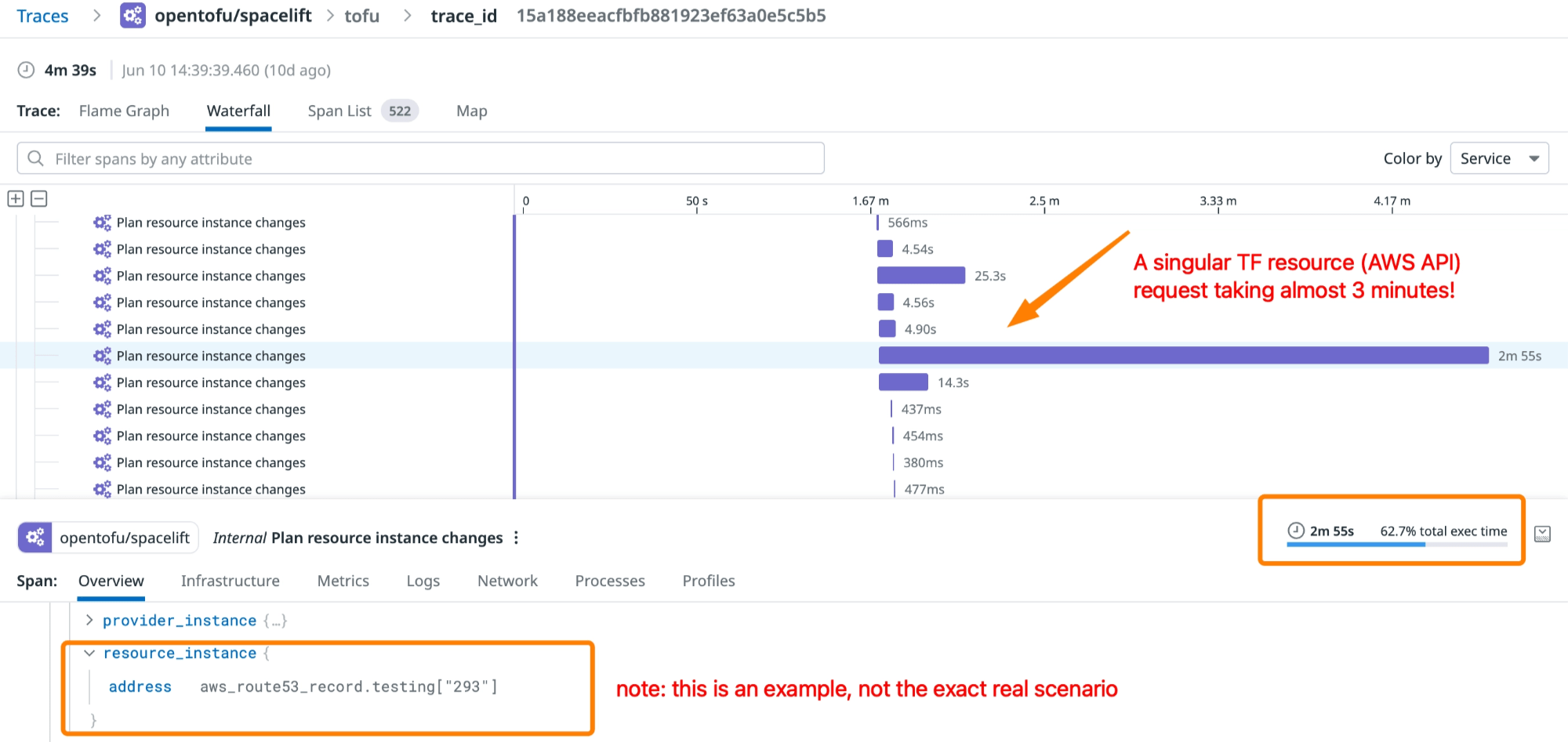
Looking at the OpenTelemetry traces, it showed that individual aws_route53_record reads (lookups that should take seconds) stretched across for minutes, for no visible reason. Setting TF_LOG=DEBUG mode showed the underlying reason: the request was rate limited and TF was retrying with backoff.
<ErrorResponse xmlns="https://route53.amazonaws.com/doc/2013-04-01/">
  <Error>
    <Type>Sender</Type>
    <Code>Throttling</Code>
    <Message>Rate exceeded</Message>
  </Error>
  <RequestId>xxxxxxxx-xxxx-xxxx-xxxx-xxxxxxxxxxxx</RequestId>
</ErrorResponse>
Route 53 has a hard cap of five API requests per second, per account, according to the official AWS documentation. We even filed a ticket with AWS support to see if there was any way to get it raised; the answer a flat “no” because DNS is critical infrastructure and 5 requests / second is the hard limit. This matches with other engineers’ experiences as well.
Buried in the 3,000 resources were 400 AWS Route 53 records, each as its own TF resource, and the provider read each record as individual API requests. 400 records (AWS API requests) at 5 requests per second is 80 seconds. But as mentioned above, in an enterprise environment, there are many dependencies, so the bottleneck compounds well past the theoretical 80 seconds.
400 records ÷ 5 req/sec = ~80s floor …and that's the best case — before any contention (since the rate limit is account-wide).
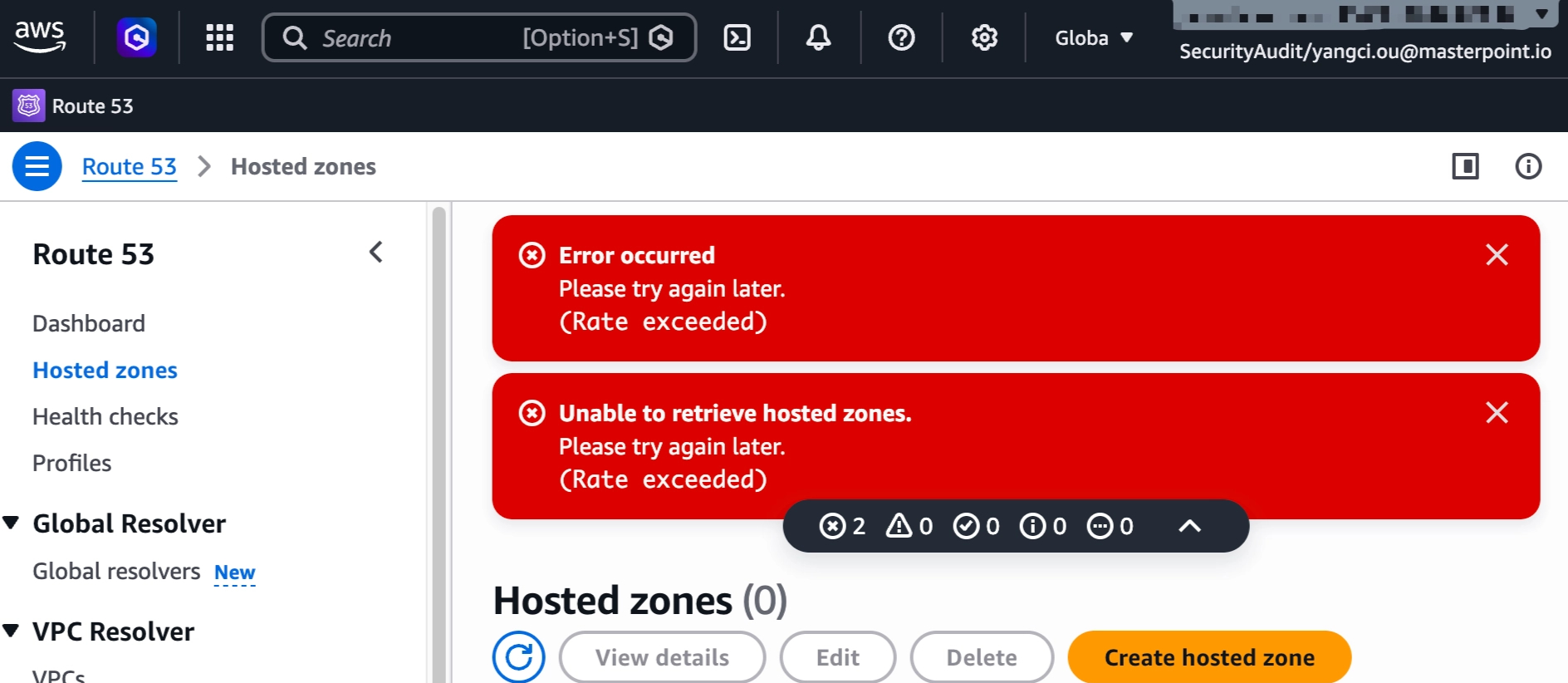
Here, even the AWS Console itself can't list Route 53 resources because the rate limit is account-wide.
Isolating the Suspect with -exclude
Because the existing setup is a Terralith — a single monolithic Terraform root module that manages multitudes of infrastructure components through one shared state, so unrelated resources are tightly coupled and can’t be changed in isolation — the fix required a refactor. We can take either of the following approaches, or both:
pull DNS out into its own small root module with its own isolated state
migrate the zone to
aws_route53_records_exclusive, which manages all records in a DNS zone as a single resource and performs a batch AWS API request.
Because any refactors would be non-trivial work, before making any architecture proposals, I wanted hard evidence to prove that Route 53 rate limiting / throttling was the bottleneck, not just a plausible story.
The hypothesis is that if Route 53 API requests are the bottleneck, then a TF plan that excludes all Route 53-related resources should be dramatically faster and show zero throttling in the debug logs. I took these steps:
Extract the
aws_route53_recordresource addresses from the TF state backend (viatofu state list, inspecting the state file directly, or with an IaC orchestration platform like Spacelift).Execute TF with the
-excludeflag. Inline, it looks like this (this stops being fun around the fifth address, especially with hundreds of records):
tofu plan \
  -exclude='aws_route53_record.alb-us-east-1-example-com' \
  -exclude='aws_route53_record.alb-us-west-2-example-com' \
  -exclude='aws_route53_record.alb-eu-west-1-example-com' \
  -exclude='aws_route53_record.alb-eu-central-1-example-com' \
  -exclude='aws_route53_record.alb-ap-northeast-1-example-com'
# ...plus the other 395
Since OpenTofu 1.10, targeting files is a cleaner option. It looks something like this, where exclude-route53.txt contains all the TF resource addresses that begins with aws_route53_record:
tofu state list | grep 'aws_route53_record\.' > exclude-route53.txt
tofu plan -exclude-file=exclude-route53.txt
Then I ran it multiple times and compared the time it took before and after. I ran this during business hours to make sure the expected API load (from all the other tools and TF plans) was present:
Before (full plan)
~5–7 min / plan
OpenTelemetry traces showing Route53 resources taking the longest, with logs showing API throttling.
After (excluding Route53)
~2 min / plan
No rate limiting anywhere in the debug logs.
Over 2× faster: 10% of the TF workspace drove more than 50% of the runtime.
The same root module, refreshing the other ~2,600 TF resources with AWS API requests, had a performance improvement of over 2x. The savings far exceed the 80-second theoretical AWS Route 53 floor mentioned earlier. That gap is the contention tax: throttled Route 53 API requests backing off and retrying behind the same account quota bucket.
Using the -exclude flag confirmed the hypothesis and proved that the Route 53 resources were the source of the bottleneck. 400 Route 53 records (roughly ~10% of a 3,000-resource workspace) accounted for more than 50% of every plan’s runtime.
The Line Between Debugging and Avoidance
It would be tempting to stop there without refactoring the TF architecture; the excluded plan is fast. Why not just run with -exclude or -exclude-file forever, only dropping the flag when you actually need to make Route 53 DNS changes in this example?
Because that’s precisely the failure mode the docs warn about. If your pipeline always skips your DNS records, you’ve stopped detecting drift on your DNS and have no way to manage them via TF. When you do want to update DNS, it’s an edge case to “un-exclude” and that’s only a band-aid to avoid.
The OpenTofu docs are blunt about targeting and exclusion, and they’re right to be.
It is not recommended to use these options for routine operations, because that can lead to undetected configuration drift and confusion about how the true state of resources relates to configuration. Instead of using resource targeting to operate on isolated portions of very large configurations, prefer to break large configurations into several smaller configurations that can each be independently applied.
We used OpenTelemetry traces with the exclude flag to isolate the problem & confirm the root cause, then went forward with the refactor. It helped us gain the hard evidence that confirms the benefits to justify the refactor.
When TF runs are mysteriously slow and you suspect a particular resource type or module is the culprit, OpenTofu’s excluding feature lets you test that hypothesis in minutes, against your real state, without refactoring a line of code or affecting real infrastructure.
👋 If you're ready to take your infrastructure to the next level, we're here to help. We love to work together with engineering teams to help them build well-documented, scalable, automated IaC that make their jobs easier. Get in touch!
这条对你有帮助吗?