From Christmas Outage to #1 App Store Ranking: An Aura Frames Postgres Scaling Retrospective
摘要
文章详细记录了 Aura Frames 应对圣诞节流量激增的数据库架构演进。针对 2024 年因 RDS 复制槽机制导致磁盘写满的严重宕机,团队在 2025 年放弃单一主库模式,采用 “全表分片” 策略,利用 Rails 的多数据库支持将负载最高的 10 张大表分散至 8 个独立 Postgres 实例。最终系统在 2025 年圣诞节成功扛住 22.6 万 TPS 的峰值压力,平均查询延迟仅 25 微秒,保障了业务在用户爆发式增长下的稳定性。
荐读理由
Aura 用 Active Record 多数据库支持将 Postgres 整个表分 8 实例,顶 10 写表任务拆分,每个实例 CPU/Mem/IOPS 涨 4.7 倍,圣诞峰 TPS 峰值 226k 秒,平均 25us 查询,完全适用于独立 AI 工程创业项目
原文
What’s Aura Frames?
Disclosures
What causes the sharp increase in traffic?
Scaling over the years
Postgres Scaling Challenges and Solutions
Christmas 2024 Retrospective
Postgres Christmas 2025
Workload-driven “Whole table sharding”
Postgres and Infra Metrics Christmas 2025
Switchover to New DBs
Reflecting back on the plan
Thank You and Looking Forward
📌 Overview
On Christmas Day 2024, Postgres infrastructure powering the Aura Frames API had problems under peak load, being unavailable for three hours and disrupting the experience for new customers. The team knew it would need improvements to handle the surge for Christmas 2025 and beyond.
One year later, much of the resource intensive data access was reworked, the Postgres infrastructure was upsized, and this approach not only survived, but thrived, providing reliable service through the holiday season.
The sum of Transactions Per Second (TPS) across the DBs peaked at 226,000, with more than 100K TPS sustained for 10 hours and repeating on multiple days after Christmas, with an average query time of 25 microseconds.
The improved reliability meant customers could smoothly set up new frames and add photos, and they did it more than ever, with the Aura Frames app reaching #1 in U.S. and Canadian Apple and Android App Stores on Christmas Day.
In this post we’ll look back at the months of planning and execution that went into achieving that outcome!
A second post in this series will dig into the Ruby on Rails side, while this one will focus on Postgres.
What’s Aura Frames?
Aura Frames (Aura Home, Inc.) is the company behind modern, high-quality, Wi-Fi connected digital photo frames that customers love.
The frames are easy to use via free iOS and Android apps, don’t require a subscription, and offer unlimited cloud storage for photos and videos. Once set up, family members can be invited to contribute photos and videos via the app from anywhere. Typically Aura frames have an average of 4 contributors adding content.
In 2025, more than 1 billion photos were shared to Aura frames globally.
While public engineering blog posts are limited, Aura was featured on the AWS Storage Blog in the past. Link: How Aura improves database performance using Amazon S3 Express One Zone for caching.
Disclosures
I began working with Aura in 2025. Aura does not have a public engineering blog, so we discussed me writing a post here where I regularly write about Postgres, Ruby on Rails, and scaling databases.
This post was written by me and I do not speak for the company. The company had the opportunity to review and make minor edits before publication.
The Christmas Day outage was a painful reality of scaling fast, and I appreciate Aura’s willingness to discuss it here.
I’m biased, but from my view the company is dedicated to continually improving the customer experience, in part with strategic investments in technical infrastructure.
With that covered, let’s take a look at how the frames are used and what drives the traffic.
What causes the sharp increase in traffic?
On Christmas Day, millions of customers set up hundreds of thousands of new Aura frames. The backend platform needs to work well for both existing customers and handle the load from new customer activity. For new customers it’s especially critical they have a good experience from their first moments with the product.
While the holiday timing is predictable, the rate of new frames and new photos added each year increases, adding a new amount of pressure to infrastructure components. Postgres is not easily horizontally scalable, and is costly to operate.
The average amount of increased peak TPS for all DBs on Christmas Day was ~4.5x, with the biggest being ~18x the normal value. To meet this demand, advanced financial planning and vertical scaling were needed. Resources were all shrunk back down after to save on costs.
Scaling over the years
The team has executed a variety of scaling tactics over the last half decade by employees and in conjunction with Postgres consultants. Scaling efforts often focused on reducing pressure on Postgres within the constraints of a single primary instance, while preserving its operational simplicity. (See: Squeeze the hell out of the system you have for a similar philosophy).
Scaling is more straightforward on the stateless, HTTP side. Aura uses AWS and has leveraged Auto Scaling Groups (ASGs), which can scale up to thousands of EC2 instances running the web application stack, image processing, PgBouncer, and other services.
For Postgres, vertical scaling of a single primary instance was leveraged as long as possible.
Here’s a look at the primary database instance at peak for Christmas Day 2024. Note that the db.r6g.48xlarge instance was the largest instance available for RDS.
| Postgres Version | RDS Instance Class | vCPU | Memory (GiB) | Storage Type | DLV |
|---|---|---|---|---|---|
| 14.x | db.r6g.48xlarge | 192 | 1536 | io2 | ⚠️ |
Without a larger instance to move to, the team could not rely on vertical scaling for Christmas 2025 and beyond.
⚠️ For Christmas 2024, the team had a Dedicated Log Volume (DLV) in place for replication from the main instance. Replication management was one of the main challenges. A DLV reduces latency and improves reliability for replication.
Quoting from AWS Docs on Using a Dedicated Log Volume (DLV):
A DLV moves PostgreSQL database transaction logs … to a storage volume that’s separate from the volume containing the database tables.
While replication lag is “normal” (asynchronous streaming replication) and varies due to write pressure, vacuum activity, and more, performance on the primary had not previously been affected by replication lag before.
Unfortunately that changed during peak load on Christmas 2024. More details are below in the Christmas 2024 Retrospective section.
Before diving into that, let’s briefly cover some of the generic challenges of reaching the scalability limits of a single instance.
Postgres Scaling Challenges and Solutions
The use of Postgres at Aura faced all kinds of common Postgres scaling challenges.
Insert latency. To help reduce latency, foreign key constraints are not used. Indexes on high write tables are minimized. Indexes are periodically rebuilt (
reindex concurrently).Replication. The product needs read-after-write behavior and can have high replication lag, so read replicas have historically not been used for read queries. Read queries run on the primary.
Buffer cache and high cache hit rates. It’s critical to have page and index content for key queries in the buffer cache to achieve sub-millisecond query durations. Buffer cache memory access also reduces storage device IOPS.
IOPS spikes that exceed the max Provisioned IOPS are problematic, resulting in queuing and high latency.
The team faced CPU spikes in the single primary configuration, during vacuum, reproduced in load testing. High query latency across the DB would follow.
During peak load periods, the system needs to handle tens of thousands of client connections from the application.
The application tracks per-user counts that constantly change. For example, social media-style likes, comments, and activity feeds. These counts are stored in Memcached when possible, with connections managed by HAProxy.
Autovacuum triggered vacuums during busy periods are disruptive. To minimize disruption, Autovacuum is throttled to run slower (
autovacuum_vacuum_cost_limit,autovacuum_vacuum_cost_delay). Tables with heavy dead tuple growth are vacuumed manually in a low activity period overnight, not by Autovacuum.Index bloat. The database uses a primary key data type that isn’t 100% ideal for minimizing bloat. Indexes are periodically rebuilt, but that process adds a lot of IOPS pressure so the timing needs coordination and PIOPS need to be upsized.
Configuration complexity. Postgres parameters (GUCs) are modified beyond what RDS provides sparingly. One exception is Autovacuum parameters which are monitored and adjusted often to help control spikes in IOPS.
Background work state and queue style data could be managed separately. The team had previously created a separate Postgres database to manage the state of background work.
Christmas 2024 Retrospective
Unfortunately on Christmas Day 2024, the team, platform, and customers faced a significant outage. A root cause analysis revealed that the main contributor was running out of space on the DLV, due to the growth of write-ahead logs (WAL) filling it up.
The team had provisioned a Dedicated Log Volume (DLV) offering lower latency as a dedicated volume for WAL log storage.
The team traced the root cause back to a change introduced in RDS Postgres 14.1 (the prior year ran Postgres 13.x which used S3 for WAL archival), which began using replication slots for replication.
“We weren’t aware RDS had changed in-region replication to use replication slots by default in Postgres 14.1. This caused the amount of WAL stored on the primary to be unbounded when the replica lagged.”
(AWS source: RDS “Monitoring replication slots for your RDS for PostgreSQL DB instance”) “RDS for PostgreSQL 14.1 and higher versions use replication slots for in-Region read replicas.”
The Postgres docs describe the benefits of replication slots: “Replication slots provide an automated way to ensure that the primary server does not remove WAL segments until they have been received by all standbys” in 26.2.6. Replication Slots.
The trade-off can be severe, as there’s the possibility of unbounded slot growth for inactive (or heavily lagging) slots, resulting in pg_wal filling the storage volume and causing Postgres to shut down. There’s a big “Caution” about this in the documentation, which looks new since Postgres version 17.
This is documented in community Postgres under Disk Full Failure (Docs for Postgres 16.x) or under “No space left on device” ENOSPC on the wiki.
The server will crash and run crash recovery.
One way to limit the growth is to set max_slot_wal_keep_size (Postgres replication docs) (new in 13, default value is -1 which means uncapped). wal_keep_size, max_slot_wal_keep_size, and max_wal_size were all updated going forward. Why set these? In a worst case, the replica would become unusable but not cause the primary to shut down.
With the replication issue solved going forward, the team faced a second issue, problematic occasional CPU spikes during vacuum. The issue was reproducible under load testing. A variety of theories were explored, evidence collected within the constraints of RDS, but no very strong causes and sources of evidence were discovered.
RDS Postgres limits access to the underlying host OS making it impossible to directly use Linux profiling tools like perf (as compared with something like running community Postgres on EC2).
Given this experience and the unsolved issue, the team began exploring moving to multiple Postgres instances, beyond a single instance. This would bring new complexity, but expanded capacity.
Proofs of concept for sharding from the application were explored. The team preferred mature solutions and a high degree of owner-operator control, thus a custom solution with Ruby on Rails framework capabilities had the lowest friction.
Ruby on Rails Horizontal Sharding was partially built out and could have been a viable solution, but ultimately was not chosen.
With more than half of 2025 gone, Christmas Day 2025 was looming and daunting. An additional constraint on possible solutions was what could be built and supported in a matter of a few months by a small team.
The clock was ticking!
Postgres Christmas 2025
The solution that seemed to fit the best would be a custom solution, rewriting a lot of the application query layer, taking direct control of key queries, high call volume, on big tables, and distributing the work to more instances.
To prepare, the top 10 tables by write operations and size were analyzed. All queries for those tables would need to be analyzed for incompatible elements that don’t work across a database boundary, like joins and some subqueries.
Ultimately the 10 tables were distributed to 7 new primary instances (making 8 in total), some DBs with as few as 1 table. All reads and writes continued to flow from the same Ruby on Rails codebase, not new microservices. To achieve that we’d use Active Record Multiple Databases support. That meant that each primary database would get the full accoutrement, including its own named config, the option of a read replica, and the ability to manage schema definition DDL changes (Rails “Migrations”). The production configuration would be mirrored in all lower environments so that the extensive unit test suite would run across all 8 databases. The only difference in the development environment was the 8 databases ran on one Docker Postgres container.
With the plan in place, it was time to start coding! We got started in earnest around August 2025 with 3 months to execute and validate the plan ahead of Christmas.
With each instance dedicated to one or a couple of tables, there was much more CPU, Memory, and IOPS available in total. This allowed each of the instances to be over provisioned temporarily before Christmas, adding headroom, availability, and reliability.
We determined the query workload for the biggest table by size, row count, call frequency and % of IO would still fit ok on a single big instance, without needing to shard the table rows.
Here’s what the instances were scaled up to for Christmas 2025. (Older generation: Graviton2 ARM and DDR4 memory)
| Postgres Version | RDS Instance Class | vCPU | Memory (GiB) | Storage Type | DLV |
|---|---|---|---|---|---|
| 17.6 | db.r6g.48xlarge | 192 | 1536 | io2 | ✅ |
| 17.6 | db.r6g.48xlarge | 192 | 1536 | io2 | ✅ |
| 17.6 | db.r6g.48xlarge | 192 | 1536 | io2 | ✅ |
| 17.6 | db.r6g.16xlarge | 64 | 512 | gp3 | |
| 17.6 | db.r6g.16xlarge | 64 | 512 | gp3 | |
| 17.6 | db.r6g.16xlarge | 64 | 512 | gp3 | |
| 17.6 | db.r6g.16xlarge | 64 | 512 | gp3 | |
| 17.6 | db.r6g.16xlarge | 64 | 512 | gp3 | |
| Totals | 896 vCPU (~4.7x ↗) | 7168 GiB (~4.7x ↗) |
With ~4.7x more CPU, Memory, and more IOPS, the expanded capacity provided plenty of power through Christmas! We’ll look at how we scaled down to reduce costs after Christmas in an upcoming section.
Let’s look at the sharding strategy in more detail.
Workload-driven “Whole table sharding”
We ended up using the term “whole table sharding” and the tables picked tended to have the most writes, the most rows, and be the most challenging to vacuum quickly or rebuild indexes for.
We were able to gradually modify all the application queries and get everything rolled out where it was backwards compatible, then we could cut over.
To transition the row data, wanting to initially replicate it, we tried using AWS pglogical and logical replication directly but the initial replication was too slow.
We may revisit that in the future, however we ultimately decided on physical replication which copied the whole instance, before cutting over to the new one. While more wasteful initially, we knew we could operate that approach reliably and with a minimal amount of downtime.
The major downside of this approach was that we had to repeat it 7 times, duplicating the entire database, consuming a ton of extra space temporarily.
We decided the trade-off was worth it; we could re-provision new instances and reduce space after Christmas by using the AWS Blue/Green deployments. More on that later.
Let’s look at some metrics from Christmas 2025.
Postgres and Infra Metrics Christmas 2025
All Postgres instances were upgraded to 17.6 in the Fall of 2025. TPS measured by Odarix. PgBouncer, Memcached, HAProxy metrics from CloudWatch. Query and schema details from PgAnalyze.
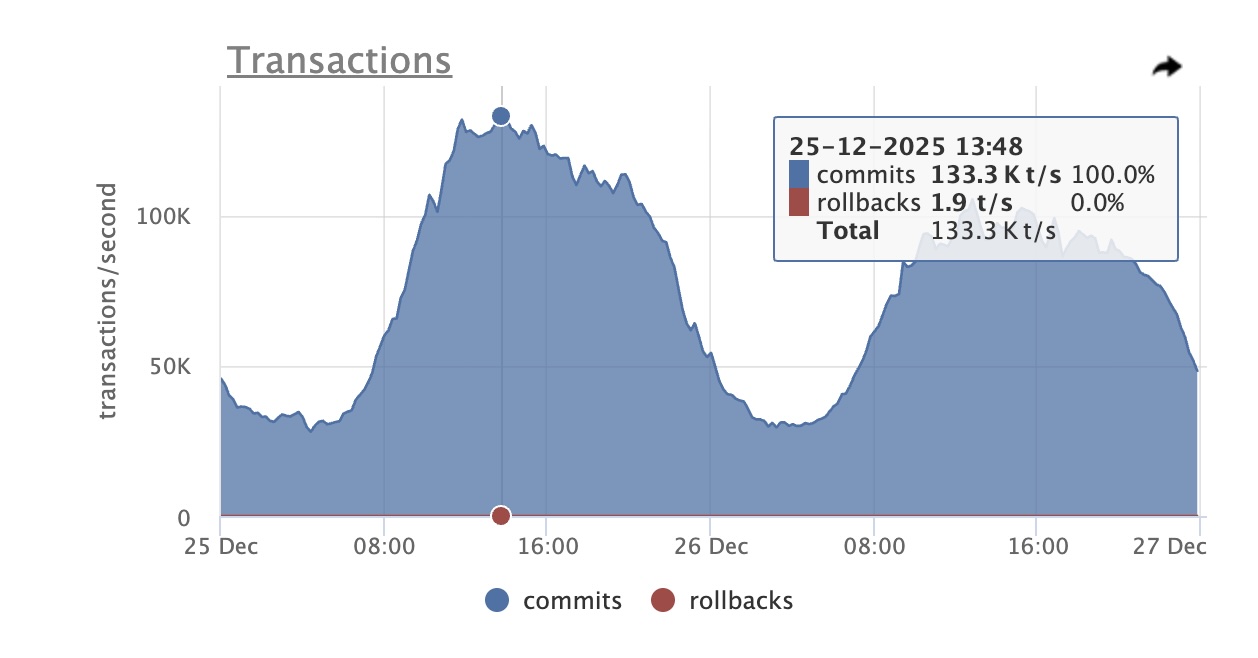 Main DB 133K TPS Peak Christmas Day Odarix Screenshot
| Metric | Normal | Christmas Day | Notes |
|---|---|---|---|
| Main DB TPS Peak | 40K | 133K (3.3x ↗) | |
| All DB TPS Peak Sum | 50K | 226K (4.5x ↗) | |
| Average query time | 25 microseconds | ||
| Largest table | 7TB | ||
| Total space | 30TB | ||
| Largest row count | 7B (Billion) | ||
| PgBouncer Instances (Sum) | 73 | 230 (~3.1x ↗) | |
| PgBouncer Client Connections | 7.3K | ~40K (~5.5x ↗) | |
| Biggest Dead Tuple Growth | 8M | 80M (~10x ↗) | ~4 hrs. Vacuum to process |
| Memcached Instances | 21 | 36 (1.7x ↗) | |
| Memcached Connections | 9.3K | ~30K (3.2x ↗) |
Traffic grows in the week before Christmas, but on Christmas day (December 25) it really takes a sharp upward trajectory. The peak load period lasts for more than 10 hours on Christmas Day, with the main DB receiving more than 100K TPS from 10:00 to 20:00 US Central Time.
Employees noticed the free Aura Frames iOS and Android apps moving up in the App Store ranks. Excitement built into the evening as the Aura Frames app moved into the top 10, top 5, and eventually reached the #1 rank. 🎉 I grabbed the screenshot below at around 11:30 PM CT December 25.
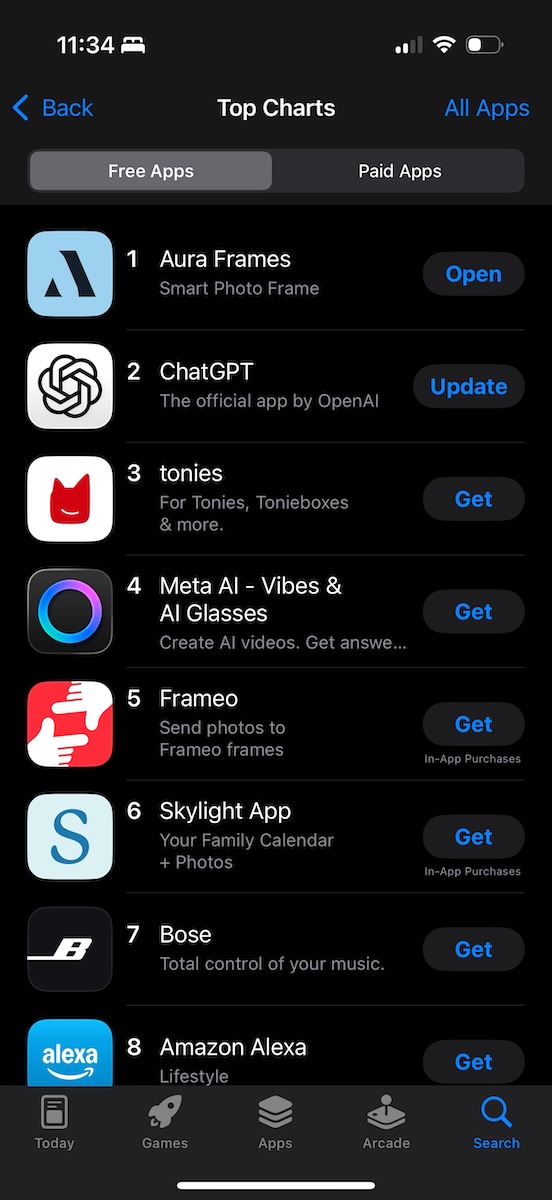 Screenshot showing the Aura Frames app at the #1 rank in the U.S. Apple App Store
Switchover to New DBs
Let’s look at how the actual switchover happened. To switch over to new server instances, effectively “relocating” the tables, it was critical to not lose any write operations and to minimize user-facing downtime.
The steps were roughly as follows:
Switchover preparation steps:
For the primary database, create a new replica. It will need as much allocated space as the primary instance. Use physical replication.
Set up AWS SSM parameters for the new database to be used by Ruby on Rails and PgBouncer.
Create a new PgBouncer Auto Scaling Group (ASG) for the new DB. Set the SSM parameter to the network load balancer endpoint.
Route application traffic through the new PgBouncer but have it continue to point at the original DB via an environment variable. Changing this param would be the sole change in the brief downtime period.
Switchover steps:
Bring all PgBouncer instances down (set ASG desired capacity to 0). No connectivity to DB now, no writes, fully down.
Wait for replication lag to reach zero. Promote the read replica to be a primary instance and wait for restart. Now it’s ready for traffic.
Change the environment variable for PgBouncer described above to now point at the newly promoted primary instance.
Bring PgBouncer instances back, setting the ASG desired capacity back to the original value.
This process involved 5-10 minutes of user-facing downtime. We performed it in an off-peak time to minimize user-facing problems. Much of the frame activity occurs in the background, so the main impact is app use. Thanks to the customer support team for helping through this period internally and externally.
Clean up of unneeded tables (due to physical replication): As mentioned, due to the choice of physical replication, the majority of the tables on each instance were not needed and should be removed.
Drop the relocated tables from the main DB. Carefully review this with team members. Initially rename table, double check again, then drop the renamed table.
Drop all unneeded tables replicated to the new whole-table shard DBs, which was most of them. This was partly scripted, and partly done manually for review and close monitoring.
With all the unneeded tables cleaned up, we now had way more allocated space than needed. Provisioned space costs money. AWS launched Blue/Green Deployments which has made it easier to replace instances with newly configured ones.
We set up a Blue/Green Deployment with the Blue as the newly promoted primary, and the Green would be a replacement instance with less space provisioned. Once replication was caught up, we cut over to Green. This process was smooth, and the result was right-sized space and cost.
Reflecting back on the plan
Some of the key contributors to successfully delivering this plan:
Having an extensive test suite running tests continuously (CI) catching regressions as code was refactored, along with PR reviews from long-tenured team members (invaluable)!
As refactorings happened in large batches, slicing out smaller chunks as smaller PRs for easier review, and less risk as releases.
Using a canary release process for widespread changes, released to a single instance vs. the whole fleet, which helped validate correctness with a small blast radius for issues that were difficult to verify in unit tests or outside of the production environment.
Having an extensive pre-production load testing capability to validate the accumulated changes under high load, across most of the API surface area of the platform, drilling into identified performance regressions.
Having a large AWS infrastructure budget 😅 to work with and strategic spending, in order to over-provision instance sizes and IOPS temporarily to gain more reliability, thanks in part to being a profitable company!
Having comprehensive CloudWatch metrics, dashboards, web, and Postgres logs for analysis (AWS Athena), time-series metrics galore (formerly StatHat), and best-in-class Postgres observability (PgAnalyze), to empower backend engineers with data access layer visibility.
Running recent versions of Postgres and Ruby on Rails, unlocking useful features for bigger scale platforms.
Experienced, long-tenured colleagues helping guide changes, focusing on high leverage opportunities, while generously sharing their knowledge and experience.
Thank You and Looking Forward
While the biggest payoff was seeing Postgres operate reliably through peak holiday traffic, it was equally rewarding to work with great engineers, be well supported by leadership, and benefit from years of accumulated scalability engineering all over the codebase. A special thank you to Josh, Ronnie, and EJ.
For 2026 we’re forming plans to further improve Postgres reliability, scalability, and cost efficiency.
If these types of posts are interesting to you, please consider subscribing to my blog or buying my book (details below).
If you’re an engineer reading this, thinking that these types of challenges would be fun to work on, please get in touch!
What’s next? Check out Part 2 which covers the Ruby on Rails side of the house.
And as always, please contact me with any questions or suggestions. Thanks for reading.
** Related Reading **
If you're interested in Ruby on Rails details for peak traffic on Christmas Day 2025, you may also enjoy Scaling Rails at Aura Frames: Splitting to 8 Primaries and Reaching #1 in the App Store.
这条对你有帮助吗?