CLI Authentication, the Right Way
摘要
文章指出当前大量 CLI(如 gcloud、wrangler、claude 等)采用 “本地启动 HTTP server + localhost 回调 + 浏览器登录” 的 OAuth 模式,在本机有浏览器时看似顺滑,但在 SSH 远程主机、容器、WSL 或共享机器等环境会直接失效或变得复杂。作者认为该模式本质上假设 “CLI 和浏览器在同一台机器”,已经不适用于现代开发场景。 对比之下,RFC 8628 的 OAuth Device Authorization Grant(Device Flow)将登录设备与执行 CLI 的设备解耦:CLI 只负责获取 device code 并轮询 token 端点,用户在任意设备输入短码完成授权。文章强调该方案更适用于 CLI、CI、容器等环境,也避免绑定端口等脆弱假设,同时可通过 OIDC discovery 获取端点减少硬编码。 文中也讨论了安全问题:device flow 存在钓鱼风险(伪造设备码诱导用户授权),但这是需要在认证提供方侧通过短码过期、显著展示 client 信息、限速和条件访问策略来缓解,而不是回退到 loopback 方案。最后作者给出实践建议:CLI 默认使用 device flow、支持自动发现端点、遵守 interval 与 slow down、用系统钥匙串存储 refresh token,并将浏览器回调方式作为可选而非默认。
荐读理由
照RFC 8628 Device Authorization Grant POST /device/code + 轮询 /token 就能实现无浏览器 SSH 容器 CI 的统一 CLI 登录,不再依赖 xdg-open 端口转发或手动 paste code
原文
CLI Authentication, the Right Way
I SSH into a fresh dev VM and run claude to start a session in there. The CLI prints a login URL with http://localhost:54213/callback buried in the query string, tries to open a browser on the remote box, and starts waiting for a callback. There is no browser on this box. The CLI catches the failure, prints Paste code here if prompted, and hangs. I copy the URL into the browser on my laptop, log in, and the consent page hands me a one-time code instead of a redirect. I paste it back over SSH. It works. It is also 2009 wearing a 2026 t-shirt.
This is a solved problem. It has been solved since 2019. Most CLIs still have not caught up.
What most tools actually do#
The pattern is everywhere. gcloud auth login, wrangler login, the older vercel login, and a long tail of vendor CLIs all run the same dance:
The CLI binds an HTTP server on
127.0.0.1at some port. Wrangler picks 8976. gcloud uses 8085. Claude Code grabs an ephemeral one each invocation.It opens your system browser to the OAuth authorization endpoint with
redirect_uri=http://127.0.0.1:<port>/callback.You log in. The provider 302s back to the loopback URL with an authorization code.
The CLI’s tiny HTTP server picks up the request, reads the code, exchanges it at the token endpoint (usually with PKCE attached), and shuts down.
You see the “you can close this tab” page that every CLI ships.
On a laptop it wraps up in about five seconds. RFC 8252, the BCP for OAuth in native apps, endorses this pattern when the app has a browser available, and for a developer running everything on one machine, it is a good fit. What 8252 does not address is what to do when there isn’t a browser on the host. The rest of this post is about exactly that case.
Why you have probably never noticed#
The localhost step is invisible. The CLI prints a URL long enough that nobody reads it, but the redirect URI is sitting right there in the query string:

gcloud auth login’s authorization URL. Buried in the query string is redirect_uri=http%3A%2F%2Flocalhost%3A8085%2F, the loopback callback the CLI just bound.
You click through, log in on the provider’s real domain, and approve. The provider 302s your browser to the localhost callback. The CLI’s tiny HTTP server reads the code, then immediately bounces you to a polished “you’re signed in” page back on the provider’s actual website. The localhost URL flashes in your address bar for a hundred milliseconds before the final redirect lands you here:
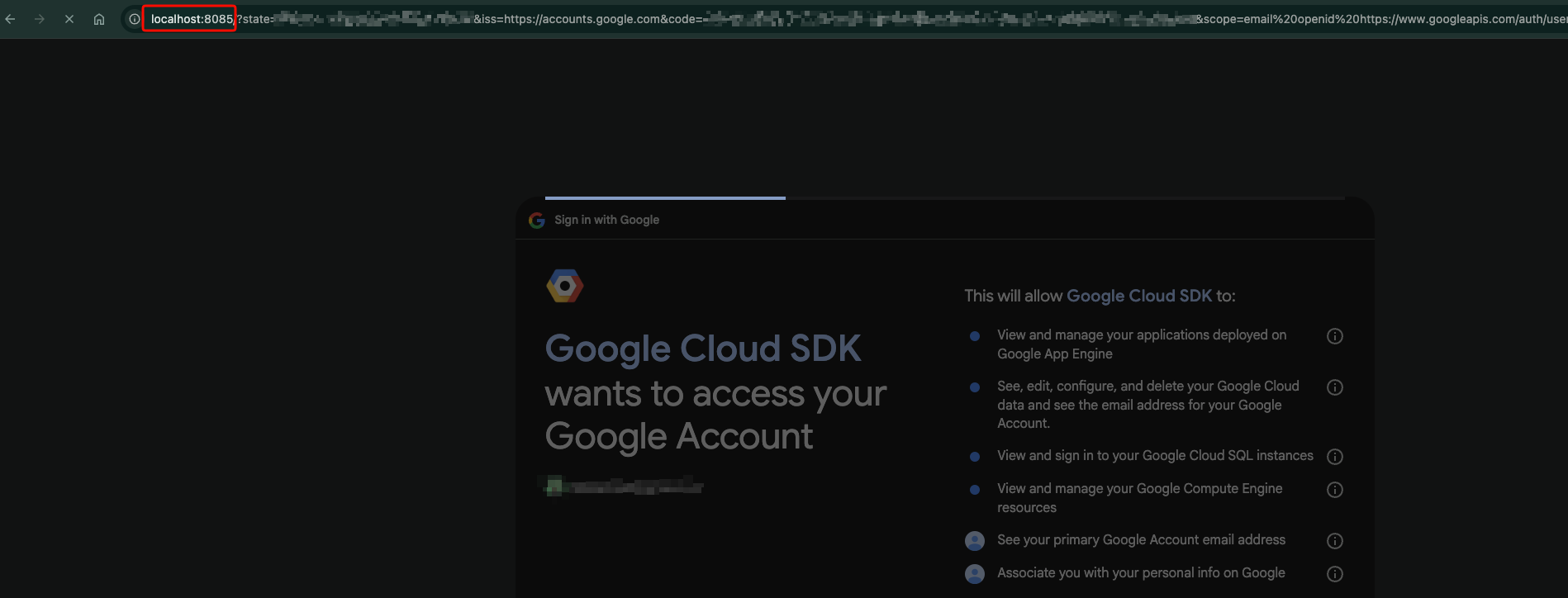
Caught mid-redirect. The browser just landed on localhost:8085, the authorization code is sitting in the query string, and the page is still loading. A blink later the CLI’s local server replies with another redirect and the localhost URL is gone.
If you blink you miss it. Most users never realize their CLI bound a local HTTP server at all. The flow looks like “log in on a website, the CLI just knows”, and the illusion holds right up until the moment you try to use the CLI without a browser sitting next to it. The same design choice that builds the illusion is the one that breaks the flow.
Where it breaks#
The whole thing rests on one assumption: the machine running the CLI is the machine running the browser. Once that stops being true, the dance falls apart.
SSH sessions. No browser on the remote host.
xdg-openeither errors out or, with X forwarding on, opens a browser on the remote box that you cannot see. You can tunnel the callback port back to your laptop, but then the redirect URI registered with the provider has to allow whatever port survives the tunnel. Most setups don’t.Containers. No browser inside, and most images don’t even ship
xdg-openoropen. You can punch the callback port through with-p, but only if you knew which port the CLI was going to grab. Cloudflare’s CLI has a long trail of issues from people stuck on exactly this.WSL. The browser opens on Windows. The loopback server runs on Linux. WSL2’s port forwarding gets it right most of the time. “Most” is the keyword.
Shared boxes. Anything else on that machine can read
/proc/net/tcpto find the listening port, or race to bind a known one. PKCE protects the code exchange. It does not protect the user’s authenticated session on the redirect itself.
Every CLI that ships this flow also ships a fallback for when it breaks. gcloud has --no-launch-browser. Wrangler hangs, and the accepted workaround is to curl the localhost URL from a second terminal yourself. Anthropic’s claude prints “Paste code here if prompted” and waits. These are all manual device flows in disguise. They exist because the real flow does not work where the CLI is actually being used.
The grant they should be using#
The OAuth 2.0 Device Authorization Grant, RFC 8628, was published in 2019 for what the spec calls “input-constrained devices”. TVs, consoles, and yes, CLIs. The whole point is to decouple the device asking for the token from the device the user authenticates on.
The protocol is short.
The CLI starts by POSTing to the provider’s device_authorization_endpoint:
POST /oauth/device/code HTTP/1.1
Host: provider.example.com
Content-Type: application/x-www-form-urlencoded

client_id=my-cli&scope=openid+offline_access
The provider answers with JSON straight out of the spec:
{
  "device_code": "GmRhmhcxhwAzkoEqiMEg_DnyEysNkuNhszIySk9eS",
  "user_code": "WDJB-MJHT",
  "verification_uri": "https://provider.example.com/device",
  "verification_uri_complete": "https://provider.example.com/device?user_code=WDJB-MJHT",
  "expires_in": 1800,
  "interval": 5
}
The CLI prints the URL and the short code (and ideally a QR for verification_uri_complete), then starts polling the token endpoint every interval seconds:
POST /oauth/token HTTP/1.1
Host: provider.example.com
Content-Type: application/x-www-form-urlencoded

grant_type=urn:ietf:params:oauth:grant-type:device_code
&device_code=GmRhmhcxhwAzkoEqiMEg_DnyEysNkuNhszIySk9eS
&client_id=my-cli
The user opens the URL on whatever device they want, not necessarily the box running the CLI. They log in, see the requested scopes and the client name, confirm the short code matches what the CLI printed, and approve.
While that happens, the polling responses cycle through the states the spec defines in section 3.5: authorization_pending while you wait, slow_down if the provider wants you to back off (the spec is explicit: bump the interval by at least 5 seconds), access_denied if the user said no, expired_token if you sat on it too long. Eventually you get a real token response.
That is the whole protocol. The CLI never binds a port, and never assumes the host it runs on has a browser sitting next to it. The same login works from a laptop, from a container, and from a CI job that pauses to wait for a human to approve.
The polling will look old-fashioned to some readers, and the first reaction I get when I show this to people is “isn’t that hammering the auth server?”. It is not. The spec defaults to a five-second interval. Most authorizations complete in well under a minute, so a typical login fires somewhere on the order of ten polls to /token and then stops. The server is in control of the rate: slow_down exists specifically so the provider can push the interval up when it is under load, and a well-written client has to honor it. Compare that to holding a WebSocket or an SSE connection open per pending login, against a stateful endpoint, for the entire authorization window. Stateless polling against /token is cheaper and simpler, and the same providers handling millions of token refreshes a day do not break a sweat over it.
If the provider supports OpenID Connect Discovery, the CLI can pull the device_authorization_endpoint and token_endpoint straight out of .well-known/openid-configuration and stop hardcoding URLs entirely.
What about phishing?#
The device flow has its own attack worth naming. An attacker can call the real provider’s device_authorization_endpoint themselves, get back a real user_code and device_code, then send the victim a phishing message: “Your IT team needs you to authorize a new device. Go to microsoft.com/devicelogin and enter WDJB-MJHT.” The URL is real. The code is real. The victim types it, logs in with real credentials, approves a real consent screen. The attacker, who has been polling /token with the device_code they generated, receives the access token. Russian threat actors ran exactly this campaign against M365 tenants from August 2024 onwards, tracked by Microsoft Threat Intelligence as Storm-2372 and attributed by Volexity to APT29/Midnight Blizzard, hitting government, defense, and NGO tenants across multiple continents.
The defense lives on the provider, not the CLI. Short user_code expiry. A verification page that shows the client name and the requesting location prominently. Rate limiting on entry attempts. Not exposing verification_uri_complete, so the attacker has to make the victim type the code instead of clicking a link. For high-value tenants the real answer is conditional access policies that block device code flow unless it is coming from a known network or device. The CLI’s job is just to honor the spec and not invent shortcuts.
None of this is a reason to go back to loopback. The device flow trades a local attack surface for a social one. Every authentication flow makes that tradeoff. The right move is to ship the flow that works in more environments and pick a provider that ships the mitigations.
A real implementation, top to bottom#
The whole thing fits in about 30 lines of Go. No framework, no SDK, just net/http:
form := url.Values{"client_id": {clientID}, "scope": {"openid offline_access"}}
resp, _ := http.PostForm(meta.DeviceAuthorizationEndpoint, form)

var auth struct {
    DeviceCode              string `json:"device_code"`
    UserCode                string `json:"user_code"`
    VerificationURIComplete string `json:"verification_uri_complete"`
    Interval                int    `json:"interval"`
}
json.NewDecoder(resp.Body).Decode(&auth)
resp.Body.Close()

fmt.Printf("Open %s\nand confirm the code: %s\n",
    auth.VerificationURIComplete, auth.UserCode)

interval := time.Duration(auth.Interval) * time.Second
poll := url.Values{
    "grant_type":  {"urn:ietf:params:oauth:grant-type:device_code"},
    "device_code": {auth.DeviceCode},
    "client_id":   {clientID},
}

for {
    time.Sleep(interval)
    r, _ := http.PostForm(meta.TokenEndpoint, poll)
    var tok struct {
        AccessToken  string `json:"access_token"`
        RefreshToken string `json:"refresh_token"`
        Error        string `json:"error"`
    }
    json.NewDecoder(r.Body).Decode(&tok)
    r.Body.Close()

    switch tok.Error {
    case "authorization_pending":
        continue
    case "slow_down":
        interval += 5 * time.Second
    case "":
        return tok.AccessToken, tok.RefreshToken, nil
    default:
        return "", "", errors.New(tok.Error)
    }
}
Point that at a Keycloak realm with the “OAuth 2.0 Device Authorization Grant” capability turned on (or any other OpenID-certified provider that supports the grant), and you have a working device-flow login.
If you are shipping a new CLI#
Default to the device flow.
Discover endpoints from
.well-known/openid-configurationso you never hardcode a URL.Honor
intervalandslow_down. The spec is not a suggestion.Store the refresh token in the OS keychain, not a JSON file under
~/.config.If you really want a loopback path for fast laptop logins, put it behind a
--webflag. Don’t make it the default.
Who got it right#
A handful of CLIs already default to the device flow:
gh auth loginhas used it from the start. It is the cleanest reference implementation I know of in open source.aws sso loginruns device flow end to end against IAM Identity Center.vercel loginmoved to RFC 8628 in September 2025, replacing email-based login and the old--oobflag.Stripe’s CLI runs its own pairing-code flow that nails the UX but isn’t actually RFC 8628.
And then there is the holdout list. Companies pulling in billions a year still ship the loopback flow by default, bolted to a paste-the-code fallback for when it inevitably falls over. Google’s gcloud. Cloudflare’s wrangler. Anthropic’s own claude. These are not scrappy weekend projects with one maintainer. They are flagship developer tools from companies with effectively infinite engineering budget, and they still ship a login flow that breaks the moment you SSH anywhere.
The escape hatch is the tell. If the “real” flow needs a manual paste-the-code fallback every time the CLI leaves a laptop, the real flow is the fallback. Ship that one as the default and stop pretending.
这条对你有帮助吗?